Friday, August 8, 2014

Screencasting and English Learners

I just want to put this out there:  I [finally] finished my masters!!  I graduated in May, after turning in my 120-page Masters' thesis (that'll leave a mark).

Here's how I looked after my graduation ceremony:

My masters is an M.A. in English as a Second Language, and my thesis was a case study of 6 3rd grade English learners.  In my research, I was interested in finding out if screencasting seemed to help develop the fluency and complexity of English learners' math language.  As it turned out, it did (especially for those students with developing levels of English proficiency)!

Check out these slides for a quick summary of my research and findings:


So what does this mean for the classroom?
  1. Offer screencasting, and the instructional scaffolds that support it, as an option in students' learning opportunities
  2. Provide a structure for academic language development and an authentic context for all students to practice it
  3. Include opportunities in your students' learning for self-assessment and reflection, as both are important to the development of language and content knowledge
  4. Engage students in peer-teaching opportunities - they're low-risk experiences for learners, provide authentic audiences for content and language practice, and they give students a chance to reflect on their understanding of the content.  


Thursday, August 7, 2014

Inspiring Girls to Code [for Good]

"Now that I've started programming, I never want to stop!" --Quote from one of the 6th grade girls I mentored as a part of the Technovation Challenge

I mentioned in a previous post that I mentored a team of 6th grade girls this year as a part of the global Technovation Challenge.  It was an awesome experience, both for me as a coach/mentor, as well as for the girls who participated, because it gave them an opportunity to create and program an app that helped address an issue or problem in their community.  My team, the #WVRCodeGirls, created a homework planner app, called Plan4U.EDU, to help middle schoolers stay more organized.  They were programming with a purpose in mind.  I liked to tell them they were coding for good.

At the end of the Technovation Challenge, many teams in MN celebrated by attending an event called Appapalooza.  Appapalooza gave all of the MN Technovtation teams a chance to pitch their apps, show a demo of their app, and describe the issue it addressed.  It was so powerful to see and hear from the teams of teenage girls about the issues they feel are important, and the apps they created to help their peers and the community address and prevent these issues.

I'm definitely planning to mentor/coach another Technovation team next year.  Interested?  Check out TechnovationMN's website for more info: http://technovationmn.org/

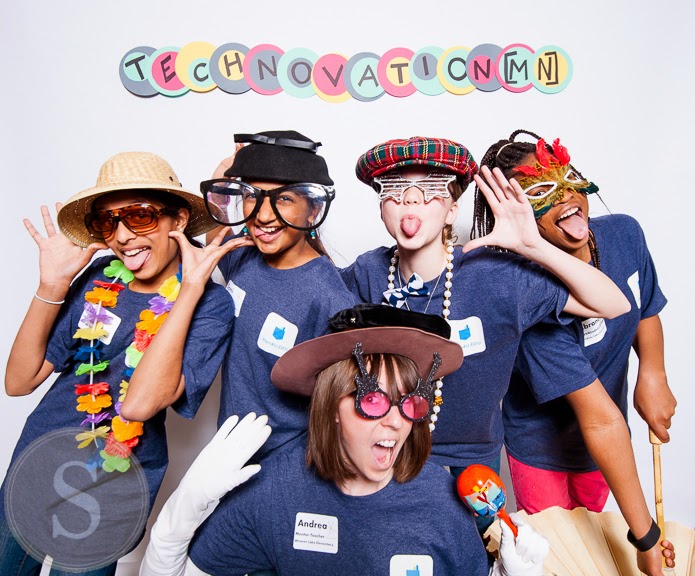
Our team at Appapalooza - photo: Satori Photography


Another excellent opportunity to inspire girls in programming is KatieCoderDojo, free 2-hour coding sessions for girls in Scratch and App Inventor at St. Catherine University.  It's so inspiring to see what the girls create!  And, no previous coding experience is necessary, so it provides a great intro to coding for girls.  I really enjoy being a part of the mentor team for these events!

The next KatieCoderDojo is August 12th at St. Catherine University - interested in signing up a girl you know?  Here's the link to the Eventbrite.


So, how do we get more girls interested in coding?
Here are my thoughts...
  • give girls opportunities to try out coding
  • give them a purpose for coding
  • connect them with other female coders; mentors and peers
  • encourage them to stick with it
  • give them resources to explore and let them know of opportunities, like TechnovationMN, KatieCoderDojo, and Google's Made with Code

My colleague, +Karla Juetten recently sent me an article entitled, How not to attract women to coding: Make tech pink by Kristen V. Brown.  It makes some great points about the gender gap in computer science, and why 'making tech pink' is not a successful way to get more females interested.

So, girls, be confident, dare to dream, and let's get coding...for good!

Monday, February 24, 2014

WVR Code Project

In an effort to bring regular, hands-on opportunities for coding and programming to the students at my school, I started a recess coding and programming group that I'm calling the WVR Code Project.  We meet once every two weeks (I wish it were more, but it's a start!), and 12 students each from grades 1-6 are able to participate.  The students usually rotate at each grade level to allow a variety of kids the opportunity to try out coding and programming.

I built a website to act as a "home base" for our WVR Code Project.  Check it out at wvrcode.weebly.com (Keep in mind that it's still a work in progress!).


Many of the younger students have loved programming with the Kodable app, and have really started to get the hang of the vocabulary and different commands.  They love unlocking new levels and new fuzzes!  We are working on coaching one another through challenges without giving away the solution - we have a strict "no spoiler alert!" motto!

With the 4th-6th graders, I am encouraging the students to set up user groups for the various different platforms and programming languages they are exploring.  Our largest group so far is the Scratch group, but we also have students who are learning JavaScript through Khan Academy and CodeAcademy, and others who are programming with apps like Kodable and Hopscotch.  In addition to reinforcing the "no spoiler alert!" motto with this group, we are also working on reflecting on successes and new learning after every session.


I am getting super interested in coding and programming myself, and have been mentoring every month through some awesome organizations that meet locally - CoderDojoTC and TechnovationMN every month.  These organizations provide free coding and programming session for kids (and at some events, just girls) on the weekends.  I leave these weekend sessions feeling energized and inspired by the incredible ideas and talents these kids demonstrate!


Through my experiences mentoring with TechnovationMN, I learned about the Technovation Challenge -  "a nonprofit dedicated to inspiring girls in technology and entrepreneurship. In the program, middle school girls work in teams to develop mobile apps, conduct market research, write business plans, and create a “pitch” for funding. Each team works with both a classroom teacher at their school and a female mentor/role model from the technology industry. The challenge culminates in a competition where teams compete for funding to take market their app. The goal of the program is to inspire girls to see themselves not just as users of technology, but as inventors, designers, builders and entrepreneurs. Technovation has reached over 1,000 girls across the country, and hopes to reach 2,000 girls this year as they expand globally."

I decided to start a Technovation team at my school and am so excited to get started this week! I'll be coaching and mentoring and team of four 6th grade girls. We decided to call ourselves the #WVRCodeGirls. Our first task is to learn the basics of App Inventor, which I've been learning and exploring through my mentoring opportunities.  I can't wait to see our team's ideas take off!

http://thenounproject.com/term/embed/5484/

I'm honestly loving geeking out with coding and programming. My next adventures include teaching myself Ruby, and joining a programming learning circle to collaborate with other Ruby users and try out what I'm learning...we'll see how I do!  In the mean time, I am also really enjoying participating in #kidscancode Twitter chat, which happens every Tuesday at 7pm, Central time. Join us, if you can!

Wednesday, January 29, 2014

#mnedchat live via Twitter and HOA

Last night, we tried something new as a part of our normal, Twitter-based #mnedchat.  We wanted to draw on the idea that everyone is an expert and has expertise to share, and at the same time, add a new dimension to our chat.  So, we decided to host a Hangout on Air with a panel of local educators who were interested in / passionate about this week's topic: creative learning spaces.  The Twitter side of #mnedchat continued to serve as a space for conversation, sharing, and questioning, and in addition, also had the added layer of acting as a backchannel for the HOA.

A group of us worked together to come up with the chat's questions, put together a doc for inspiring resources on creative learning spaces, and collaborated on a vision for how the HOA and Twitter conversations would come together to make sure as many #mnedchat participants' voices as possible could be heard.

It was such an energizing event to be a part of!  Here are a few of my reflections after the fact...
  • It was so fun to see, hear, and be a part of the interaction between the Twitter chat and the HOA. Shout outs/mentions, retweets, questions, answers, and conversations happened across both mediums, and made for an in-depth discussion of ideas around creative learning spaces.   
  • I was glad the HOA panel was comprised of local educators who were passionate about the topic. I think it would have changed the tone if we would have featured a world-renowned expert instead.  I liked that it felt casual and that the panelists were regular #mnedchat participants with ideas to share.  I hope that this feeling 
  • Next time, I would like to strike more of a balance between the HOA and the Twitter chat.  I was moderator of the HOA this time, and so found myself focusing a lot on the discussion there.  Next time, I would like to be better about tweeting out the ideas that really resonated with me during the chat so that I could have a quick reference of those ideas later.
  • Another aspect I would do differently next time would be to pay better attention to the Q&A feature through HOA.  After the chat ended, I realized that there were three questions in our Q&A that I never brought up during the hangout.  The Q&A is such a cool feature, and it was exciting that people were using it to ask questions!  Next time, I will have that feature up within my hangout screen so I can more closely monitor it.
I'd like to give shout out to the group of amazing people who helped plan and facilitate #mnedchat last night: +Nicholas Christensen,  +Caleb Lee , +Kimberly Hurd Horst , +Brian Boothe , +Shaelynn Farnsworth .  A huge thank you, also, to all who participated in #mnedchat last night - thanks for all of the great ideas and conversation!  I feel so fortunate to have such an awesome PLN.

If you missed the event, feel free to check it out whenever you'd like:


Check out a summary of Tweets from #mnedchat via +Kimberly Hurd Horst 


Also, please feel free to add to our collaborative resource list on creative learning spaces:


We also created a Padlet for people to post ideas on how to transform a 'traditional' classroom space into a creative and innovative learning environment.  Check it out (and add your own ideas) here:

http://padlet.com/wall/mnedchat12814


Thanks again for tuning in, everyone!


Thursday, January 9, 2014

Taking Coding and Programming to the Next Level


The way I see it, it all starts with curiosity and a challenge.  How do I move this from one spot to another?  How many steps will it take me to move it?


That's all it takes for many of us to get hooked - on a game, an activity, or a real-life task -- our brains go to work trying to plan out the most efficient course of action.  And when that doesn't work, we reflect, redesign, and re-try.


Many students, classes, and grade levels in my school participated in the Hour of Code in December, 2013....and an hour was only the beginning for most!  Students and staff alike had a blast helping out Angry Bird on Code.org, designing a holiday card with Scratch, and solving all kinds of coding puzzles on Tynker.


Some students had already tried out Scratch, others had done block-based programming in our 6th grade Robotics unit using LEGO Mindstorms NXT Video Trainer, but most of the 1st through 6th graders who tried programming through the Hour of Code had never done it before.  And, they definitely didn't want to stop after an hour or a week.


Beyond the students' and teachers' enthusiasm for coding and programming, I saw some pretty awesome results during the Hour of Code at our school.  Here are a few of my favorites:

  • students reflected on and persevered through failure to reach a goal
  • students collaborated with one another to discuss ideas, challenges, and questions
  • older students acted as coding and programming mentors to younger students to help them talk through ideas...without giving away the answers 

So, I'd like to take coding and programming to the next level in our school.  I am organizing a recess coding and programming group, and am working with teachers to incorporate coding and programming into lessons, units, and as options for student choice.  I am also working to connect with other educators who are expanding beyond the Hour of Code in their school through Twitter and Google +.


 A few informational / inspirational resources on taking coding and programming beyond the Hour of Code:

I came across an article on 3 ways to continue coding after the Hour of Code that discussed some great options, including the tons of resources and activities available through Code.org; a coding app through Edmodo called LearnStreet, and ideas for offering PD that focuses on the value of coding across curriculum.

Here's a great article by Kevin Hodgson on learning coding in writing class - he makes great points about the importance of understanding how technology works and actively gaining the skills that can help to bridge the gap between technology consumers to technology creators.  I also love the parallel he draws between coding and composition (I'm a language geek at heart, after all) -- great points for incorporating coding and programming into language arts, among other subject areas.

Lastly, I recently read a blog post by Rae Fearing about how her 5th graders used the Hopscotch app to create a game and share it with their 1st grade buddies - pretty awesome!  I'd love to try this out with my recess coding and programming group.


What are your favorite resources for coding and programming with students?

How are you continuing beyond the Hour of Code?

I'd love to hear your ideas - feel free to leave a comment below!

Friday, January 3, 2014

Blogging in the new year


Hey 2014, let's get blogging... A new year, a fresh perspective, a renewed vision.

The past couple of years, as an ELL teacher, I had a pretty clear sense of my blogging focus: ed tech tools and resources that enhanced English language teaching and learning.  It was a specific topic, and I found my blogging rhythm (fairly) quickly.  This year, in my new position as a technology integration specialist, it's been harder for me to focus in on one specific theme for my blog....and as a result, I haven't quite established my blogging routine...yet.

Over winter break, I had a chance to do some reflecting on my blog and the direction I'd like to take it in the new year.   I realized that there are basically three kinds of ed tech blog posts that I love to read, talk about, and write:

  • content curation, reflection, and response
  • successes and/or failures with an app, tool, or resource
  • content generation, brainstorming, creative expression


So, I've decided to use those three categories as guides to help me focus my blogging in 2014.

And what better time to start...than the present.


http://sociallysorted.com.au/
wp-content/uploads/2013/08/
Canva-Image-.jpg

One of my favorite techie tools out there is a free graphic design website called Canva.  Although this site was not designed specifically for educators, I have loved using it to help me design and publish graphics for presentations, posters, websites, my blog, logos, and even my family holiday card.  I love graphic design, and have been on the look-out for an easy-to-use, free graphics resource.  It is currently in Beta and in order to use it, you sign up for an invite - I got mine in a day or two.


Pros:
Canva currently provides templates for 11 different design platforms / sizes:
  • Business card
  • Invitation
  • Poster
  • Photo collage
  • Card 
  • Social media
  • Facebook cover image
  • Blog graphic
  • Presentation
  • Document
  • Christmas card
Once you choose a design type, you have over 1,000,000 images to choose from to build your design.  Most are free - those that aren't free cost $1.00.

You can customize your design by changing the color, text, size, layout, combination, and alignment of the different images.

You can share your design directly to Twitter and Facebook, you can email a link to it, or you can download it to your computer to print or share.

You can give your friends instant access to Canva once you sign up - sharing really is caring when you find an awesome resource.


Cons:
At this point, the only con I've discovered while using Canva is that it doesn't yet have an EDU version to make sure the graphics are filtered for student use.  Even so, I love it as a tool for my own teaching and graphic design, and highly recommend that you give Canva a try!


What are your blogging resolutions for 2014?  

How do you structure and focus your blog?  

Have you tried out Canva or another, similar tool?  


I'd love to hear from you - please share your comments below!


Saturday, December 7, 2013

The Power of Connecting through Student Blogs


I am a people person.  I love to share, connect and collaborate on a daily (even hourly) basis - I find it energizing, inspiring and validating...and it helps me to learn and grow, both as a professional and as a person.  I am constantly amazed by the awesome things my colleagues are doing, and am grateful to have a PLN that is made up of people from various areas of expertise.

I was in a training about a month ago where the presenter mentioned a survey he had given to the leaders of various companies.  The survey asked about the top skills companies look for in new employees.  Any guesses about the responses?  The top answers given were... the ability to collaborate, and good communication skills.  These are skills we need to model, develop, and encourage in our students across content areas.

At the beginning of the school year, all of the staff members at my school are asked to share a hope and dream for the school year.  My hope centered around giving students opportunities to share their learning in meaningful ways (check out my video below to hear it first-hand).


When students share their learning with others, I find that they take ownership over what they know - and what they still don't know.  They are reflective and thoughtful about what to share and how to communicate it.  They collaborate on building a better understanding of the concept before, during, and after sharing.

Enter 6th grade math class.  A 6th grade teacher, +Mary R Moran, and I began co-teaching math last year, and together decided to be very intentional about teaching the academic language associated with the math concepts we were teaching, as we had many English learners in our class (I was the ELL teacher), as well as other students who seemed to have gaps in their understanding of basic math concepts.  We wanted to provide our students with an authentic audience for practicing the vocabulary they were learning, and we wanted to find a way to archive and share all that each student was doing.  So, we had each student create a math blog.  Students posted math reflections and work samples on their blogs, and then commented on one another's blog posts to ask questions, share information or make connections with what they read.  It was a great experience.  The students took pride in what they posted to their own blogs, and really enjoyed commenting on each others' blogs.  In addition, they had meaningful, authentic opportunities to share and practice their developing math vocabulary and understanding of mathematical concepts, and we could see their confidence in themselves and their math abilities grow as the year went on.

When this year began, Mary and I knew we definitely wanted the students to create math blogs.  But this year, we wanted to take connecting to the next level.  We started searching for other classes that were doing math blogs in an effort to encourage students to connect beyond the walls of the classroom.  On Twitter, I came across an awesome site called Mathleteblogs.com - a site by @MathletePearce where student math bloggers can connect and share their math learning.
Image from Mathleteblogs.com

The students are so excited to connect with other students from around the world on Mathleteblogs.com!  They've already started exploring and leaving comments on the other students' math blogs.  (We discussed the blogging golden rule:  You have to give comments to get comments.)  They also discovered their blogs' stats and audience tracking feature and are really excited to see that people from around the world are checking out their math learning -- talk about an authentic audience!


The power of connecting has been very evident already this year with this group of 6th grade math students.  They work hard to master 6th grade math concepts, they reflect on their learning, including strengths and challenges, they archive and share their learning on math blogs, and they deepen their understanding and increase their confidence by connecting and collaborating with students around the world through blogging.


How do students in your school connect and share their learning?  
Leave a comment below!

Would you like to connect with our math bloggers?  
Check them out here: http://d279.us/math6blogs